Display Data by Buildings
The General Availability screen displays the availability/occupancy data individually for each building available at the property.
Feature Setting
The following feature setting must be enabled to display data for each building in the General Availability screen:
-
Name: General Availability by Building
-
Value: Must be enabled
-
Comments: License is not required
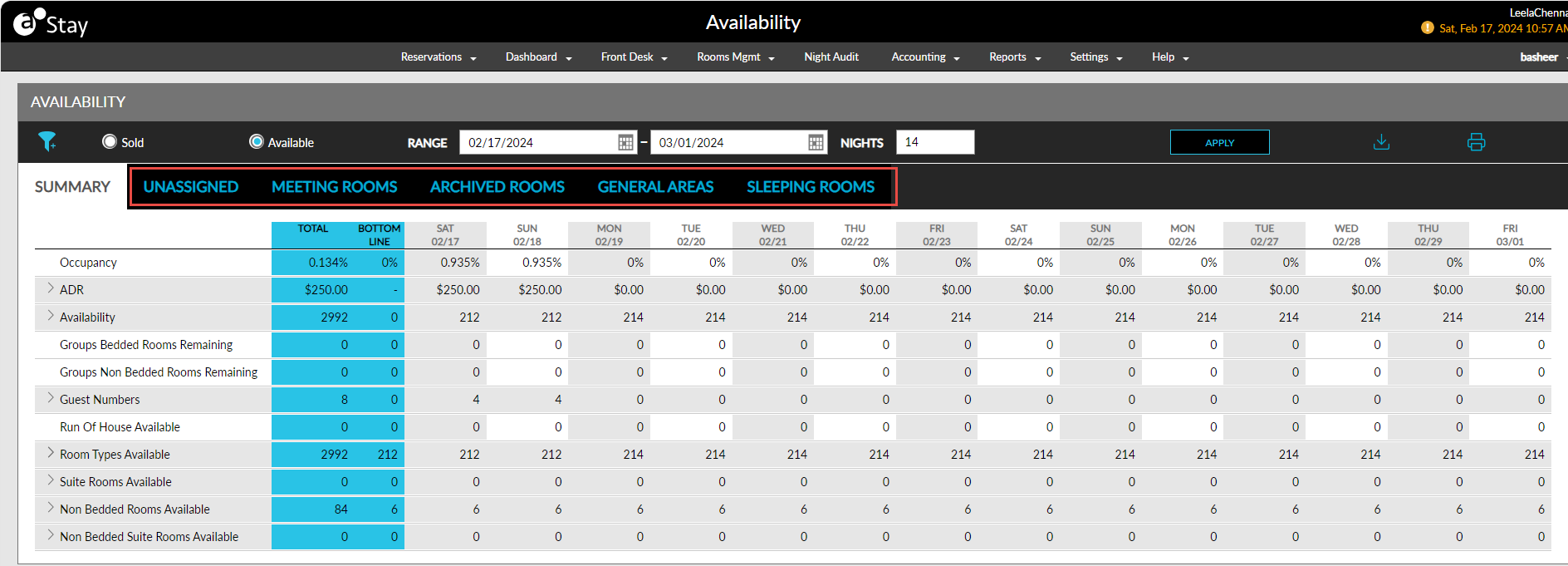
When the feature setting is enabled, the following tabs will appear in the General Availability screen that displays availability/occupancy data for each building available at the property:
-
Summary: Displays the consolidated availability/occupancy data for all the buildings.
-
Unassigned: Displays the availability/occupancy data for all the reservations in the selected date range that do not have rooms assigned.
-
Buildings: Displays the various buildings available in the property as individual tabs. The availability/occupancy data for all the reservations in the selected date range that have rooms assigned are displayed under the respective building in which the rooms are located.
Users must click the Print icon to print the details displayed in each tab.
Users must click the Export icon to export the details displayed as a CSV file. For example, if users export the data displayed in the Summary tab for the date range 07/05/2022 to 07/18/2022, the exported file is named in the following format: GA_SUMMARY_2022-07-05_2022-07-18.